


Start with what can actually go wrong
Most conversations about whether a coding agent is “safe” start in the wrong place. They ask whether the model can be trusted: whether it hallucinates, whether it leaks, whether the vendor trains on your input. Reasonable questions. But before any vendor checklist, name the problems. When a company puts an AI to work there are three distinct classes of sensitive data in play, plus a fourth problem that is not about data at all.
Personal data. Anything about identifiable people (customers, employees, applicants) sits under the GDPR. Where it may be processed, by whom, under which agreements, for how long: these are legal questions, and they are settled by where the data goes, not by how good the model is.
Company secrets. Pricing, source code, contracts, roadmaps, deal material. No regulator supervises this class, but the loss mechanism is harsher: a leaked trade secret is simply gone. What matters here is retention, subprocessors, and whether anything you send can resurface somewhere you don’t control.
Professional confidentiality. Doctors, lawyers, tax advisors, auditors: professions where secrecy is a legally protected duty with personal liability attached, well beyond any company policy. For this class, “the vendor seems trustworthy” is not an available answer. You have to be able to show, from evidence, where the data went and where it did not.
The fourth problem arrives the moment the AI stops being a chat window and becomes an agent: it acts. A coding agent with shell access can hallucinate a command the same way a chat model hallucinates a citation. The difference is that this hallucination executes. It can delete files, overwrite a config, push to the wrong remote, fire a request at a live system. A wrong answer costs you a correction; a wrong command costs you whatever the system it ran on was holding.
A serious setup has to answer all four. Keep that list in view, because the answers do not all live in one place, and no single product setting covers them.
The thing you’re securing isn’t the model
Notice what those four problems share: none of them is settled by trusting the model more.
The moment you give a coding agent shell access, a filesystem, and network egress, the object you have to secure stops being the model. It becomes the agent’s workspace, and everything that workspace can reach. A public repository is a G0 asset, nothing sensitive and nothing to lose, right up until the agent in that repo can read .env, tail the logs, open a ticket queue, load a production config, act under a commit identity, or pull in a snippet of client context. At that point the workspace is effectively G3, and the model was never the variable that changed. What changed is reach: which of the three data classes the agent can now touch, and what its acting arm can now break.
In my line of work, running agents against systems that hold real professional-secrecy data, that shift is the whole game. You are not deciding whether to trust a model in the abstract. You are deciding what a fast, tireless, occasionally confidently-wrong process is allowed to touch — and proving, from evidence, that it can only touch that.
This is a build guide for exactly that. By the end you will have Claude Code routed through Amazon Bedrock in a region you chose, under an identity that can invoke exactly one pinned model, wrapped in a containment layer that scopes what the agent can do, plus a way to verify, not assume, that the traffic went where you sent it. It is boring, it is cheap, and every piece of it is available today.
What you’ll build, and what you need first
Here is the whole shape in one paragraph. Claude Code runs on your machine as it always does; instead of calling the default consumer endpoint, an environment variable points it at Amazon Bedrock, in an AWS account and region you control, using a pinned model it is allowed to invoke and nothing else. Around that call sits a sandbox: an allowlist of files and tools, read-only behaviour by default, and hard caps on how far a single run can go. In front of it sits local preprocessing: the step where secrets and personal data are stripped before anything leaves the machine. That is the destination.
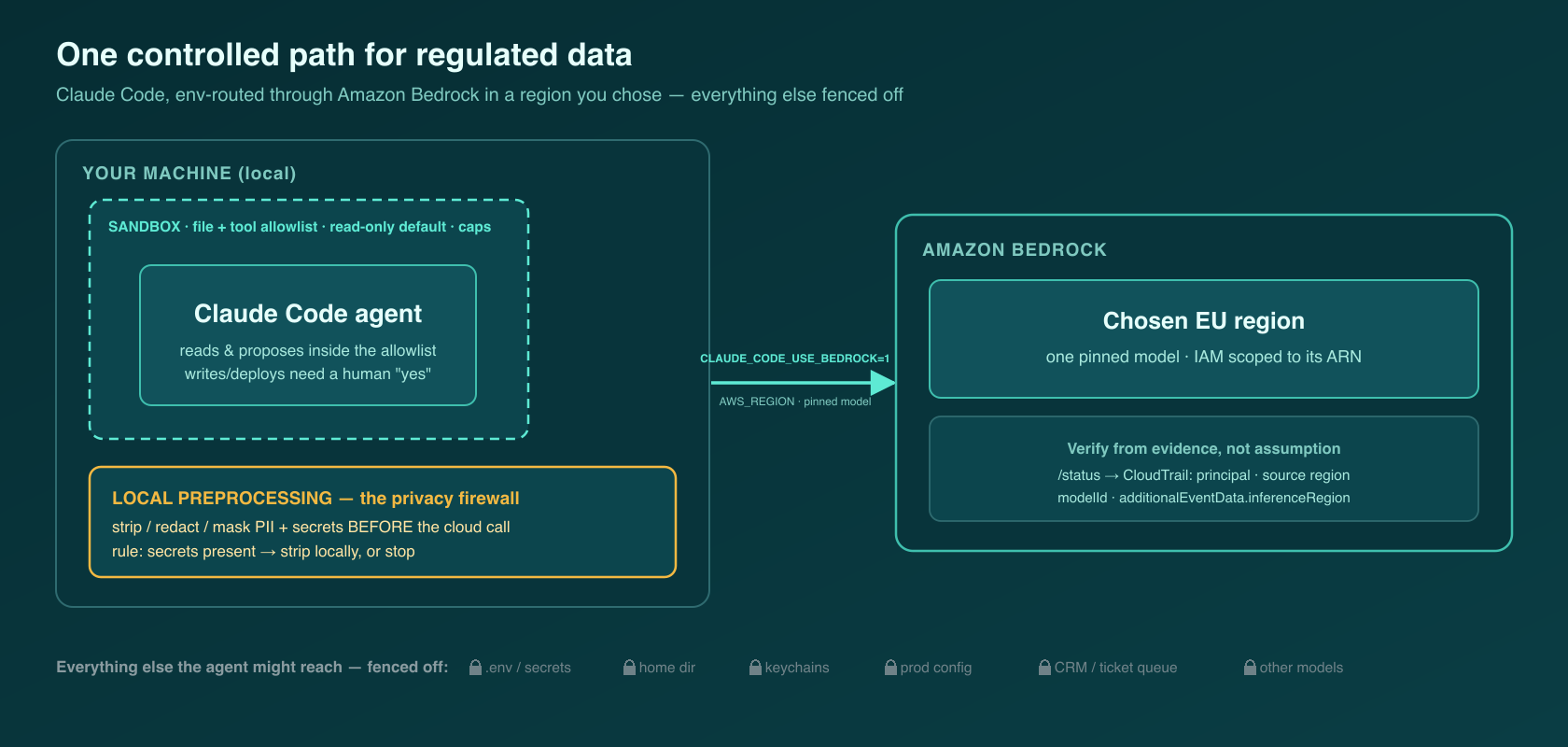
You need four things and no exotic infrastructure: an AWS organisation you can create a new account inside; the ability to request Bedrock model access; Claude Code installed; and enough terminal comfort to edit a JSON settings file and run a couple of aws commands.
Be clear that this is one answer, not the only one. A consumer chat account gives you no credential control and no region control, the two things a regulated workload is built on. And “they don’t train on my data” is a real commitment about one thing and silent about others: no-training is not no-transfer, and processing location, subprocessors, and retention are separate promises a consumer login does not let you set. A vendor enterprise plan adds contract (a data-processing agreement, admin controls) but still leaves credentials and routing in the vendor’s hands. Routing through a cloud you already govern (Amazon Bedrock here, with counterparts on the other hyperscalers) puts the model behind your own IAM, region choice, and audit log; that is this article. And sandboxed or local containment (an agent locked into an approved workspace with no reach beyond it) attacks the fourth problem, the acting agent, most directly; serious setups combine it with one of the routing options. This piece is the first in a series that walks those paths one at a time: AWS now, sandboxes and containment in the pieces that follow. Bedrock is the door that has the locks; the rest of this article installs them.
Stand up a dedicated AWS account with Bedrock model access
Start with the account, because the account is the boundary everything else hangs on.
Create a dedicated AWS account for this, not a corner of a shared one. A separate account is your blast radius, your billing line, and your region fence in a single object. If the agent’s workload ever needs to be frozen, audited, or torn down, you want it to live somewhere with clean edges.
Choose the region deliberately, because for regulated-Europe work the region is a data-residency question, not a latency one. Be precise about what “region” actually buys you; this is where teams slip. Two things are in play. First, the source region you call (the one you set with AWS_REGION) is not necessarily where inference runs: Bedrock’s cross-region inference profiles can route the actual model call to a destination region elsewhere in the profile’s geography. Second, AWS’s “EU” geography label on those profiles is an AWS routing construct, not a legal EU/EEA residency guarantee: the AWS “Europe” grouping can include locations outside the EU/EEA (London / eu-west-2 sits in AWS Europe, but the UK is outside the EU/EEA). So do not read an eu.-prefixed profile as GDPR residency on its own.
For a professional-secrecy workload, do it in this order: decide where the data is legally allowed to be processed, then read the specific profile’s destination-region list on the model’s detail page and confirm every possible destination is acceptable. The AWS inference-profiles reference is the canonical source for that list. Bedrock is available in several European AWS regions (Frankfurt / eu-central-1, Ireland / eu-west-1, and Paris / eu-west-3 sit inside the EU; London / eu-west-2 does not), and model availability varies by region: the Claude model you want may not be enabled everywhere. Pick for legal residency first; confirm the model and its routing keep the data where it must stay second.
Now request Bedrock model access for the Claude model you intend to pin. In the Bedrock console this is the “model access” screen; access is granted per account, and you enable only the model you need. From the CLI you can confirm which identity you’re operating as and which models and profiles are visible in your region:
aws sts get-caller-identity
aws bedrock list-inference-profiles --region eu-central-1
aws bedrock list-foundation-models --region eu-central-1
Note that list-foundation-models returns everything in the region regardless of whether you’ve been granted access. Visibility is not the same as a grant. The console “model access” screen is where the grant is confirmed, and the definitive proof is a test call you verify in CloudTrail (next step).
Access on its own is more power than the agent should have. Scope it down before you point anything at it.
Lock down IAM and pin the model
This is the security core: an identity that can invoke exactly one thing.
Create a dedicated IAM role or user for the agent, and give it a policy that grants Bedrock model invocation and nothing broader: no bedrock:*. The canonical Anthropic Bedrock documentation’s own starter policy is an honest baseline:
{
  "Version": "2012-10-17",
  "Statement": [
    {
      "Sid": "AllowModelAndInferenceProfileAccess",
      "Effect": "Allow",
      "Action": [
        "bedrock:InvokeModel",
        "bedrock:InvokeModelWithResponseStream",
        "bedrock:ListInferenceProfiles",
        "bedrock:GetInferenceProfile"
      ],
      "Resource": [
        "arn:aws:bedrock:*:*:inference-profile/*",
        "arn:aws:bedrock:*:*:application-inference-profile/*",
        "arn:aws:bedrock:*:*:foundation-model/*"
      ]
    },
    {
      "Sid": "AllowMarketplaceSubscription",
      "Effect": "Allow",
      "Action": [
        "aws-marketplace:ViewSubscriptions",
        "aws-marketplace:Subscribe"
      ],
      "Resource": "*",
      "Condition": {
        "StringEquals": { "aws:CalledViaLast": "bedrock.amazonaws.com" }
      }
    }
  ]
}
Attach it and confirm the identity resolves:
aws iam put-role-policy --role-name claude-code-bedrock \
  --policy-name bedrock-invoke-pinned --policy-document file://bedrock-policy.json
aws sts get-caller-identity
Two things about that policy. The AllowMarketplaceSubscription statement lets the account subscribe to the model on first use; once the subscription exists (often managed centrally) you can drop it. And read the Resource wildcards as a to-do rather than a finish line: they let the identity invoke any profile or foundation model, which is convenient for setup and too loose for a pinned deployment. This is your hard backstop: replace the wildcards with the exact region and the exact inference-profile (or foundation-model) ARN you pinned. IAM resource scoping, not an env var, is what actually stops the agent from reaching a model you didn’t approve.
Pin the model explicitly. Do not float to “latest.” This instruction gets handed out often and explained rarely, so here is the why before the how. A model version is not an interchangeable part: each behaves differently, is priced differently, and carries its own data-handling terms. Floating to “latest” means all three can change underneath a workflow you already validated, without anyone in your organisation deciding it. Pinning turns that around, and buys four things a regulated deployment needs:
- Reproducibility. The workflow you tested is the workflow that runs; the same task behaves the same way next quarter. Without a pin, “it worked in the assessment” and “it’s what runs today” quietly stop being the same claim.
- Change control. A model upgrade becomes what every risk framework says a change to a system touching sensitive data must be: a decision with a date, an owner, and a test, rather than something that happened to you.
- Cost predictability. Per-token prices differ by model; a silent model swap is a silent budget change.
- The audit trail. “Which model processed this data, and under which terms?” is a question a DPO or auditor will ask, and the terms attach to the exact model. The abuse-detection caveat at the end of this article is a live example: retention terms differ model by model. If you cannot name the model, you cannot name the terms.
Now the mechanics. Bedrock model identifiers are cross-region inference profile IDs, prefixed by geography: us. for the US, eu. for the EU grouping, us-gov. for GovCloud, in the pattern <geo>.<provider>.<model>. The prefix selects the routing geography, not a residency guarantee (see the region caveat above): an eu. profile routes only within that profile’s destination-region list, which you still have to read and accept. Verify the exact current profile ID and its destination list on the model’s detail page before you rely on it. AWS moved that detail onto individual model pages, and model IDs rotate. (The eu.anthropic.claude-sonnet-4-6 used in the example below was current on 2026-07-10; re-check it at build time.)
Pinning the env var is not the same as enforcing the model: a user can still switch models inside a session. Two things close that gap: managed Claude Code settings (availableModels plus enforceAvailableModels) constrain which models a session may select, per the model-configuration docs; and underneath, the IAM Resource scoping from the last step is the hard stop no client setting can talk its way around.
On credentials: Claude Code uses the default AWS SDK credential chain, so you have good options and one rule. The good options are aws configure profiles, standard AWS_ACCESS_KEY_ID / AWS_SECRET_ACCESS_KEY / AWS_SESSION_TOKEN env vars, and SSO, the one I reach for with humans: AWS_PROFILE plus aws sso login, which gives you short-lived credentials instead of long-lived keys. The rule: credentials go through the chain, never pasted into a chat window. A secret typed into a prompt is a secret you have to assume is gone.
The agent now has a narrow, controlled door. Point it at that door.
Point Claude Code at Bedrock, then verify it
This is the step where it works and, more importantly, the step where you prove it works.
Routing is one environment variable. Set CLAUDE_CODE_USE_BEDROCK to 1 (the string "1", not an integer), and Claude Code calls Bedrock instead of the default endpoint. Configure it as shell environment variables or, more durably, in ~/.claude/settings.json under an env block:
{
  "env": {
    "CLAUDE_CODE_USE_BEDROCK": "1",
    "AWS_REGION": "eu-central-1",
    "ANTHROPIC_MODEL": "eu.anthropic.claude-sonnet-4-6"
  }
}
AWS_REGION sets the source region Claude Code calls. Set it explicitly even if your profile already carries one, but remember it is the region you call from, not necessarily where inference runs (a cross-region profile routes to a destination in its geography). Set ANTHROPIC_MODEL to the pinned inference-profile ID from the previous step, the same one your IAM policy is scoped to. (There are per-tier defaults, ANTHROPIC_DEFAULT_OPUS_MODEL / _SONNET_MODEL / _HAIKU_MODEL, and a service-tier control if you need them; on Bedrock, Claude Code falls back to your primary model for the small background model when a Haiku-class model isn’t enabled in the account or region.)
Authenticate, then start the session; with SSO that is a login first:
aws sso login --profile your-bedrock-profile
claude
Now the part people skip: verify from evidence. A first successful turn tells you the agent is talking to something. It does not, by itself, prove the call went to Bedrock, in your region, on your pinned model. Prove it, cheapest check first:
-
/statusinside the session shows the active model and that Bedrock is the provider. A quick sanity check: not audit-grade, but it catches an obvious misconfiguration in two seconds. -
CloudTrail is the audit-grade proof. Bedrock
InvokeModelandInvokeModelWithResponseStreamcalls surface as events carrying the calling principal, the source region, and the requestedmodelId(or inference-profile ID). For a cross-region profile, the region the inference actually ran in appears asadditionalEventData.inferenceRegion. That field, not the source region, is the one you check against your residency requirement. Pull the recent events with:aws cloudtrail lookup-events \ --lookup-attributes AttributeKey=EventName,AttributeValue=InvokeModel \ --region eu-central-1That gives a DPO or auditor a logged record of which identity invoked which model, from which source region, resolving to which inference region, instead of “we believe it routed correctly.”
-
Bedrock console → usage / model-invocation metrics (CloudWatch) gives invocation counts against the pinned model in the chosen region, a good ongoing dashboard once you’re past setup.
One sharp edge worth a sentence: the agent tooling can internally convert a bare foundation-model ID into a cross-region inference profile. So don’t assume the ID you set is the ID that ran: pin the inference-profile form you want, then let CloudTrail confirm the modelId and inferenceRegion that actually fired. Assume nothing you can log.
Routed and verified. But a routed agent is still an agent with reach. Contain it.
Contain the agent: allowlist, caps, guardrails, and the local privacy firewall
Routing decided where the model call goes; it answered the three data-class questions. Containment decides what the agent can do on the way there and back, and it is where the fourth problem from the top, the agent that can hallucinate a destructive command, is actually held. This is least-privilege applied a second time: to the agent’s capability envelope instead of its IAM identity.
Treat the four controls below as requirements to implement rather than a single command to paste. The allowlist, the caps, and the local preprocessing are enforced by whatever agent-runtime, sandbox, or wrapper your setup runs; Bedrock Guardrails is its own separate configuration step. What follows is what each control must do and why. The exact mechanism is a follow-up implementation task scoped to your tooling.
File and tool allowlist. Name the repositories and paths the agent may touch, and default everything else to off. Home directories, .env files, keychains, and credential stores are never on the list. Pair the allowlist with read-only by default: the agent can read and propose, but writing, deploying, sending email, or touching a CRM requires explicit confirmation. Most of an agent’s useful work is reading and drafting; make the irreversible actions the ones that need a human “yes.”
Caps. Put ceilings on steps, cost, and runtime. These are the sandbox boundary in numeric form: the thing that turns “the agent looped and burned the afternoon” into “the agent hit its step cap and stopped.” Tune the caps to the data class in front of you, not uniformly. A G0 experiment strangled by G3 friction just teaches people to route around the controls; the highest-sensitivity work is where the ceilings come down.
Bedrock Guardrails are a real layer, and it helps to be precise about what they are and aren’t. Guardrails is a configurable policy layer that inspects the content crossing the model boundary (content filters, denied topics, word filters, sensitive-information and PII filters with redaction, contextual-grounding checks) on both input and output. What Guardrails do not do is police what the agent can reach on your machine. They filter the prompt and the response; they do not contain the agent. You need both: Guardrails on the content that crosses to the model, the sandbox and allowlist on what the agent can touch locally. Wiring a guardrail into the Claude Code path is a separate configuration step, a distinct follow-up task in your setup rather than something this walkthrough turns on for you. And if you run one with a cross-region inference profile, enable cross-region on the guardrail too, or the two won’t line up.
Local preprocessing is the privacy firewall, and it is the control most people miss. Before the cloud call, strip, redact, or OCR-and-mask the PII and secrets out of what the agent is about to send. The operating rule is simple: secrets present → strip locally, or stop. What never leaves the machine materially reduces what can be retained or transferred downstream. Reduces, not eliminates: the same data can still surface in local logs, temp files, shell history, and plugin state, so those need their own controls; and the preprocessing itself has to be tested, not assumed to work. For professional-secrecy data this is not an optimisation; it is the line between a defensible workflow and an incident.
You have built one controlled path. The last question is where it belongs.
Where this path sits in a data-class routing model
Everything above is the approved path for one band of your data, the sensitive and production classes, inside a routing model. It is not a universal setting you flip on everywhere.
The spine of that model is easy to sketch and hard to argue with: classify the work by data class (G0 through G3), by zone, and by whether agentic execution is in play, and route each combination to green, yellow, or red. Agentic execution raises the floor: the same data class carries more control when an agent can act on it than when a human is reading a chat window. The Bedrock-routed, contained, locally-preprocessed setup in this article is what “green for sensitive/production” looks like in practice.
The reason this framing matters is the sentence it lets you hand upward. You did not “approve Claude Code” (a claim no DPO can evaluate and no auditor can bound). You approved a specific path for a specific data class: this model, in this region, under this identity, with these caps, verified by this log. That is an answerable question, and answerable questions are what get past a risk committee.
That’s the build. Before you rely on it, verify it honestly, and know what it isn’t.
Verify, caveats, and where this goes next
Run this checklist before you call it done, and again whenever the setup changes:
- Traffic goes to Bedrock, on the model you pinned, resolving to an inference region you accept, confirmed from CloudTrail (
additionalEventData.inferenceRegion), not assumption. - The file and tool allowlist holds;
.env, keychains, and home directories are outside it. - Read-only-by-default holds; write, deploy, and send actions require confirmation.
- Step, cost, and runtime caps are set, and tuned to the data class.
- Local preprocessing runs before the cloud call; secrets-present means strip-or-stop.
Now the honest caveats, stated plainly.
Bedrock is a control point, not compliance. Routing through it buys credential and region control the consumer path never had. It does not make you compliant on its own. Region, retention, subprocessors, and IAM scope are still yours to set correctly, and getting the door right doesn’t audit itself. Test the containment (actually try to make the agent read something it shouldn’t) rather than trusting that the config means what you think it means.
Check the data-handling terms of the exact model you pin. AWS runs each provider’s model in isolated Model Deployment Accounts, so the model provider has no access to your prompts, completions, or Bedrock logs; traffic is encrypted in transit (TLS 1.2 or higher) and at rest. AWS’s stated position that Bedrock does not use your prompts or outputs to train the base models lives on the Bedrock FAQ. Treat it as AWS’s documented commitment, and point at the FAQ rather than repeating it as an unsourced absolute. And read the one exception carefully: Bedrock’s general policy is not to store your inputs and outputs, but abuse detection is an exception. For some specific models, AWS retains inputs and outputs for up to 30 days and requires you to opt in to sharing that retained traffic with the provider for abuse detection and potential human review. Once you opt in to retention, that data has left AWS’s data and security boundary. For a professional-secrecy workload, that opt-in may be a hard no. So before you pin a model, check whether it carries that requirement. As of July 2026 this applied to certain newer model tiers (for example Anthropic’s Fable 5, with different terms applying to some OpenAI models), but the exact list changes; verify it against the abuse-detection documentation for the model you pin, before you deploy.
Vendor mechanics move. This reflects the product as of July 2026: the environment variable names, the IAM action set, and the routing mechanism are the stable parts; the exact model IDs, EU inference-profile identifiers, and the abuse-detection model list rotate. Pin against the canonical docs at the time you build, and re-check when you upgrade.
None of this is dramatic, and that is the point. The build amounts to a handful of AWS objects and three environment variables, and every safety property in it is something you can point a log at. Agentic safety is a scoping decision (what can this workspace touch, and can you prove it?), not a leap of faith about whether a model deserves your trust. Get the scope right, and the rest is plumbing.
This is the first build in the Claude Insights series, and deliberately so: of the options surveyed at the top, the AWS path is the one most teams can walk today, so it goes first. The pieces that follow work through the rest: the sandboxing deep-dive takes the containment path further, for the acting-agent problem this article could only fence in; the routing-model article gives you the spine that decides which class of work belongs on which path. Follow those to turn one verified path into a policy that answers all four problems this article opened with, not just the one a vendor checklist covers.
The AI Leadership Journal is written by Claudius Gramse. evonomics is the independent AI consultancy helping mid-sized European companies embed AI into the work that actually runs their business — evonomics.eu.